I built an iced coffee calculator to stop doing math by the kettle

I’d been making iced coffee with James Hoffmann’s Hario Switch technique and really enjoying it.
The coffee wasn’t the problem. The arithmetic beside the kettle was.
In Hoffmann’s recipe, the ice counts as part of the total water. That makes sense. It also means changing the batch size requires recalculating the coffee, hot water, and ice while I’m standing next to the brewer and scale.
With its valve closed, the Switch lets the coffee steep. Open the valve and it drains into the waiting ice.
The calculation isn’t difficult. I just didn’t want to do it every time.
I also like the Clever Dripper, which works well with the same immersion idea. I wanted a small tool where I could choose a brewer, change the size of the batch, move the ice split, and immediately get the three numbers that matter.
So I built the Iced Coffee Calculator.
The ratio math took a few lines. Most of the work went into scaling six techniques without flattening their timing, then keeping an enthusiastic ice cube away from the controls.
The arithmetic I wanted to remove
The default recipe uses 500 mL of total water, a 1:13.3 ratio, and 34% ice. The calculator turns that into:
- 37.5 g coffee
- 330 mL hot water
- 170 g ice
Those are the three numbers I wanted.
The math is straightforward:
coffee = total water / ratio
ice = total water * ice percentage
hot water = total water - ice
For the kitchen, I treat 1 mL of water as roughly 1 g. Coffee rounds to the nearest half gram. Ice rounds to a whole gram, and hot water gets whatever is left.
That last detail matters. An early version rounded the ice and hot water independently. Each value looked reasonable, but for some combinations the two added up to a different total than the user requested.
The current version rounds the ice first, then subtracts it from the total to get the hot-water amount. Now the hot water and ice always add up to the requested total.
There is a test that checks every whole-milliliter batch from 150 to 1,500 mL against every ice percentage from 20% to 50%. That is 41,881 combinations, which is more iced coffee than I plan to make personally.
One recipe became six
The first version was centered on Hoffmann’s iced immersion method. It worked with the Hario Switch and the Clever Dripper, and it solved the problem I actually had.
Then I started looking at other published iced-coffee recipes.
Counter Culture’s flash brew puts ice in the carafe, then uses a bloom and pulse pours. April’s high-ice recipe uses equal amounts of hot water and ice. Kurasu’s Japanese iced V60 uses a 1:13.75 total-water ratio and three distinct pours.
Lance Hedrick’s low-ice technique keeps the ice out until the coffee has finished brewing. AeroPress’s Japanese-style recipe adds a press stage.
Together with Hoffmann’s immersion recipe, they gave me six distinct starting points without filling the menu with minor variations.
The differences are large. April puts half of its total water into ice. Lance uses only 20%. The interface adjusts ratios in tenths, so Kurasu’s preset displays 1:13.8. Kitchen rounding still produces the source batch: 16 g coffee, 150 mL hot water, and 70 g ice.
I left cold brew and drinks such as Vietnamese iced coffee and a shakerato out for now. Once concentrate dilution, milk, syrup, or an overnight brew enters the picture, it is a different calculator.
The timer had to belong to the recipe
Adding ratios was easy. Adding useful instructions was not.
At one point, the timer belonged to the broad brewing method. Every flash-brew recipe inherited roughly the same sequence. That was fine when there was one flash-brew recipe. It became wrong as soon as there were several.
Kurasu uses three timed pours with specific cumulative targets. Counter Culture ties the bloom to the coffee dose, then scales later pours from the hot-water amount. Hoffmann’s immersion time changes with the roast selection.
Lance is the clearest exception. At 1:45, its timer stops counting down and starts counting up through the final pour, drawdown, and chilling. The ice goes in at the end.
Those aren’t cosmetic differences.
I moved the timing rules into each recipe. Each one now defines its setup, duration, cues, quantity targets, release stage, and finishing instructions. Targets can be a fraction of the hot water, a multiple of the coffee dose, or a fraction of the ice.
A simplified Kurasu profile looks like this:
{
  duration: fixed(130),
  steps: [
    { at: elapsed(0), target: hotWaterFraction(40 / 150) },
    { at: elapsed(40), target: hotWaterFraction(100 / 150) },
    { at: elapsed(70), target: hotWaterFraction(1) }
  ]
}
If the source batch doubles, the timer turns 40, 100, and 150 mL into 80, 200, and 300 mL. The amounts scale. The original cue times remain guidance because a larger brew will not necessarily draw down at the same rate.
The timer itself records timestamps instead of incrementing a counter and hoping the browser keeps perfect time. A short interval refreshes the display, but elapsed time is always derived from the start time, pause duration, and current time. That keeps the clock from drifting if the browser slows a background tab.
It also supports pause and resume, optional sound and vibration cues, and a screen wake lock when the browser allows one. Once the fixed part of a recipe ends, drawdown and pressing stages count upward because the brewer, grind, and coffee get a vote too.
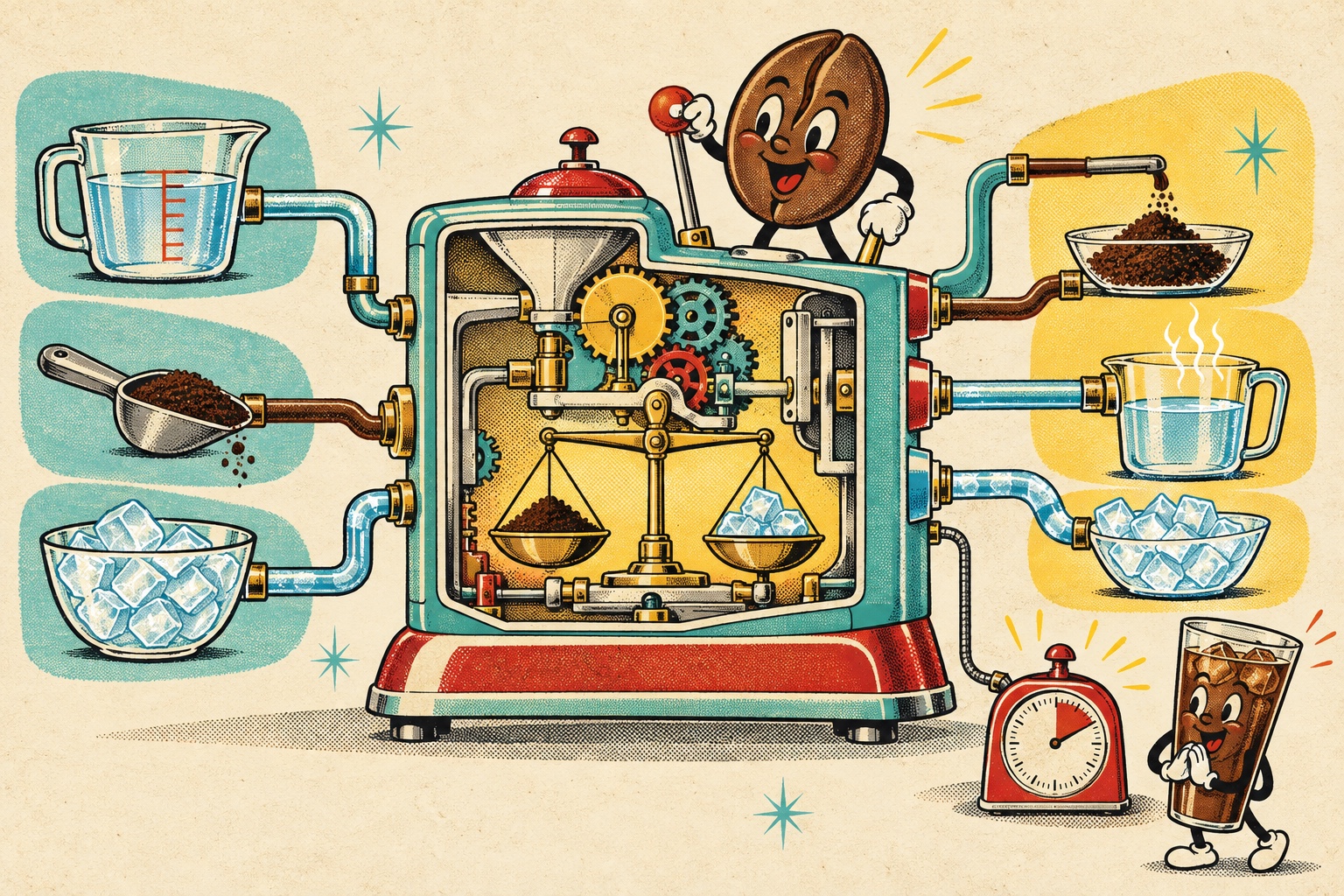
The machine is imaginary. The path is real: recipe inputs, brew math, then scaled timer instructions.
Making it look like a countertop comic
I didn’t want another tasteful beige coffee app.
The visual direction came from 1950s appliance advertisements: refrigerator aqua, mustard yellow, cherry red, heavy black outlines, halftone dots, and shadows that look printed instead of blurred. The calculator is arranged as one connected Pick, Tune, Brew comic strip.
That structure came from a set of early mockups. I liked the second direction best because the three sections felt like one object instead of three unrelated cards. On a phone they stack vertically. On a wide screen they read across like panels.
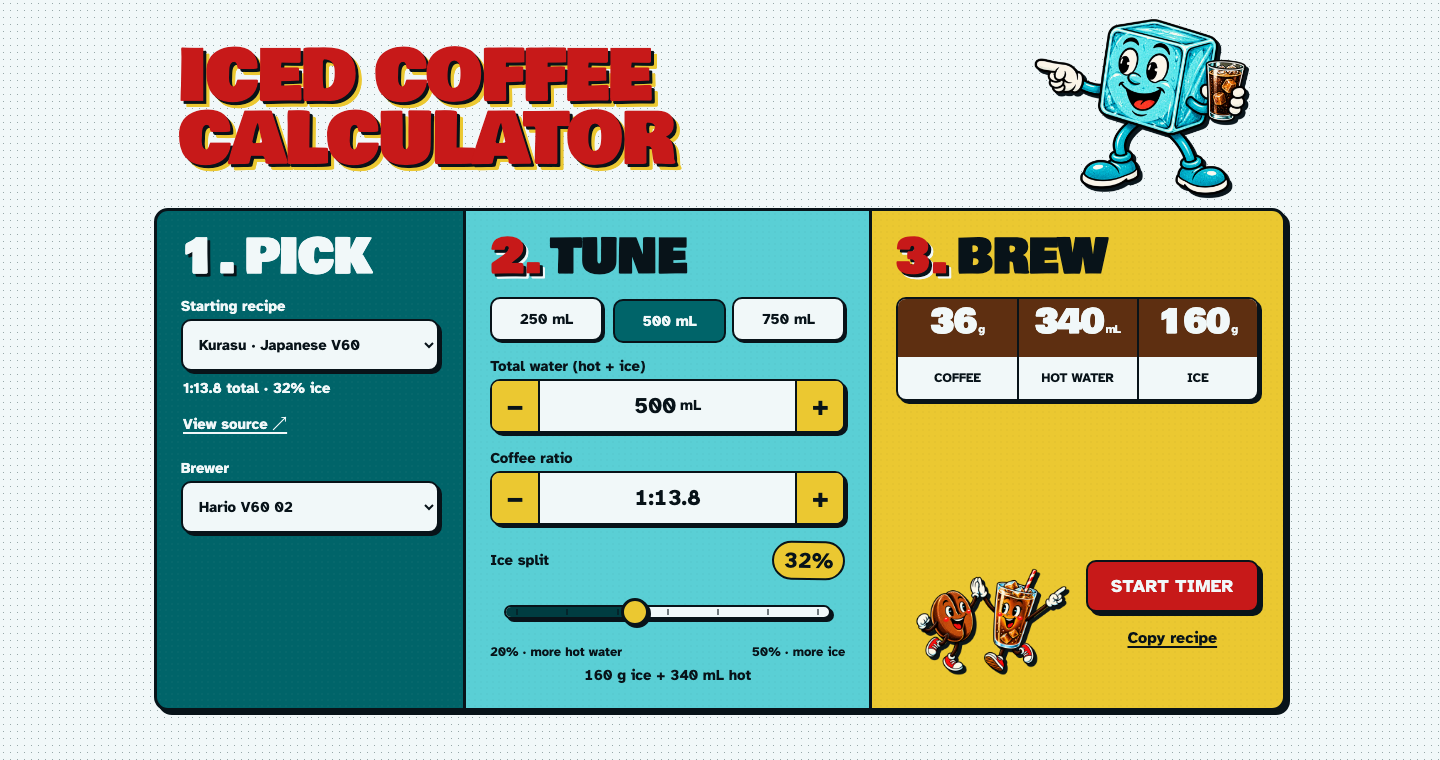
The finished interface keeps the comic framing, but every field and button is a standard browser control underneath.
The working title was Ratio Hero. I didn’t like it. The shipped name is Iced Coffee Calculator, which is less clever and much more useful.
The mascot survived.
I liked the little ice cube and asked for it to be more prominent. Then the same character showed up twice on one screen, which made the app look like it had accidentally cloned him. In the final version, the ice cube owns the masthead. A coffee bean and an iced-coffee glass show up near the brew button and timer.
I used generated artwork for the characters, but kept the controls and numbers in HTML and CSS so they would stay crisp, selectable, and accessible. Generated art could be expressive without being trusted with interface text.
The small bugs mattered
I built the app with Codex, an AI coding agent. It made visual experiments and data-model changes fast, but I still had to inspect each result in the browser, especially at phone widths.
Most of the defects between the mockup and something I would actually use were small.
The original recipe selector had a Custom option that changed as values changed. It was trying to answer two different questions: which recipe did I start from, and have I adjusted it? The final version keeps the selected recipe stable. If I change its ratio or ice split, an Adjusted badge appears with a Reset action.
The mascot artwork overlapped the Start Timer button on desktop. We fixed it, then a phone-width screenshot showed the characters standing on the button again.
Browser-supplied spinner arrows appeared beside the water and ratio inputs, even though the interface already had large plus and minus buttons. The arrows were technically valid and visually confusing, so they went away.
The ratio and water values were centered according to the layout box, but the prefix and unit had different widths. 1:13.3 and 500 mL looked like they were leaning in different directions. The fix was to let the editable number size itself from an invisible mirrored value, then center the complete prefix-value-unit group.
None of those fixes added a feature. They removed the little visual arguments I noticed every time I tried to use the calculator.
Why the app has no backend
The app is React, TypeScript, and Vite, built as a static progressive web app on GitHub Pages. It has no account, database, application server, or API.
The React components mostly handle the screen. The coffee math and brewer rules live in plain TypeScript functions that are easy to test. Timer profiles are data, and one function combines the selected recipe with the calculated amounts to produce the instructions on screen.
Settings stay in local storage. The storage key is versioned, and the app can still read settings saved by the old Ratio Hero version. If storage is blocked or full, the calculator works; it just starts fresh next time.
The service worker caches the app shell, code, artwork, and bundled fonts. After the first visit, losing a connection does not take the calculator away mid-brew.
Pushes to the main branch run the tests and production build before GitHub Actions deploys the static files. The suite currently runs 30 tests across brew math, timer behavior, source-batch reproduction, and profile validation.
Most of the code is ordinary React. The recipe model carries the coffee-specific behavior.
Try it
The finished calculator supports the Hario Switch 02 and 03, Clever Dripper, NextLevel Pulsar, Hario V60 02, April Brewer, and AeroPress with the Flow Control cap for the recipes that fit them. It warns when an immersion brewer cannot hold the selected hot-water dose and can scale the batch down to fit.
You can try the Iced Coffee Calculator or look through the source on GitHub.
The default remains Hoffmann iced immersion with the Hario Switch, where the project began. I can choose a batch size, adjust the ice, and let the calculator handle the split.
Then I can get back to making the coffee.