Two GitHub certifications in 24 hours: How I studied for GH-900 and GH-300
Two weeks into my new job at GitHub, I had already finished two things that were part of my first 90-day onboarding plan: the GitHub Foundations (GH-900) and GitHub Copilot (GH-300) certifications.
I passed both comfortably, less than 24 hours apart.
I didn’t start out trying to do that.
I knew from day one that I needed both certifications, and I wanted to knock them out early rather than watch a 90-day deadline slowly turn into a day-89 problem. I started studying almost immediately and figured I’d take them one at a time.
Then I passed Foundations.
By then I’d also done a fair amount of Copilot prep. I took another practice assessment, looked at what I was still missing, and realized I was probably ready for that one too.
That’s when the 24-hour idea showed up. Once it seemed possible, I wanted to see if I could do it.
So I took Copilot the next day.
Both exams were online, and I finished each in under 30 minutes.
The back-to-back part made for a fun milestone, but the more useful part was the week leading up to it. I ended up combining official training, videos, community question banks, a study tool built by colleagues, and a lot of practice with AI.
Some of those resources were better for learning. Some were better for drilling. The combination worked well enough that by exam day, the real tests felt pretty familiar.
If you’re studying for GH-900 or GH-300, this is the process I’d use again.
Why I took the certifications seriously
The simple reason I took the exams is that GitHub required them as part of my onboarding.
I still wanted to get something useful out of them.
I’ve spent a long time working in technology and came into GitHub with plenty of practical experience around software development, Git, GitHub, and AI-assisted development. Experience helps, but it also tends to get concentrated around whatever you use most often.
You can be very comfortable with one part of a platform and barely touch another.
The certifications gave me a reason to work through GitHub more systematically and find those gaps.
For Foundations, that meant taking things I’d picked up over years of using GitHub and making sure I understood the broader platform around them: repositories, collaboration, permissions, security, Projects, administration, and the rest of the GitHub workflow.
Copilot was a little different.
I was already using Copilot and other AI development tools, but day-to-day use only shows you part of the product. Studying pushed me into areas like content exclusions, administration, context, prompting, responsible AI, privacy, and capabilities I might not run into during a normal coding session.
There was a credentialing piece to it too.
Starting at a new company means building credibility again. A certification doesn’t replace experience, and passing an exam doesn’t make someone an expert. For me, it was a useful way to take knowledge I already had, fill in the missing pieces, and validate it.
I had 90 days.
Finishing both in week two felt pretty good.
What GH-900 and GH-300 actually cover
The two exams are pretty different.
GitHub Foundations (GH-900)
Foundations is broad.
It covers Git and GitHub basics, repositories, collaboration, modern development practices, GitHub Projects, security and administration, and GitHub’s community and open-source ecosystem.
If you’ve used GitHub for a while, a lot of that will look familiar. Branches, commits, pull requests, issues, repository settings, and the usual collaboration workflow are all there.
The challenge is the range.
Most people don’t use every part of GitHub equally. You might live in pull requests and almost never touch Projects. You might understand permissions well enough for your job without knowing every role distinction. You might use open-source software all the time and still have very little reason to think about InnerSource, repository templates, Marketplace, or some of GitHub’s community features.
That’s where the exam helped me.
I wasn’t learning GitHub from scratch. I was looking at the parts I normally use alongside the parts I normally don’t.
If you’ve already got GitHub experience, that’s probably the biggest thing to keep in mind about GH-900. Knowing Git and knowing the whole GitHub platform are different things.
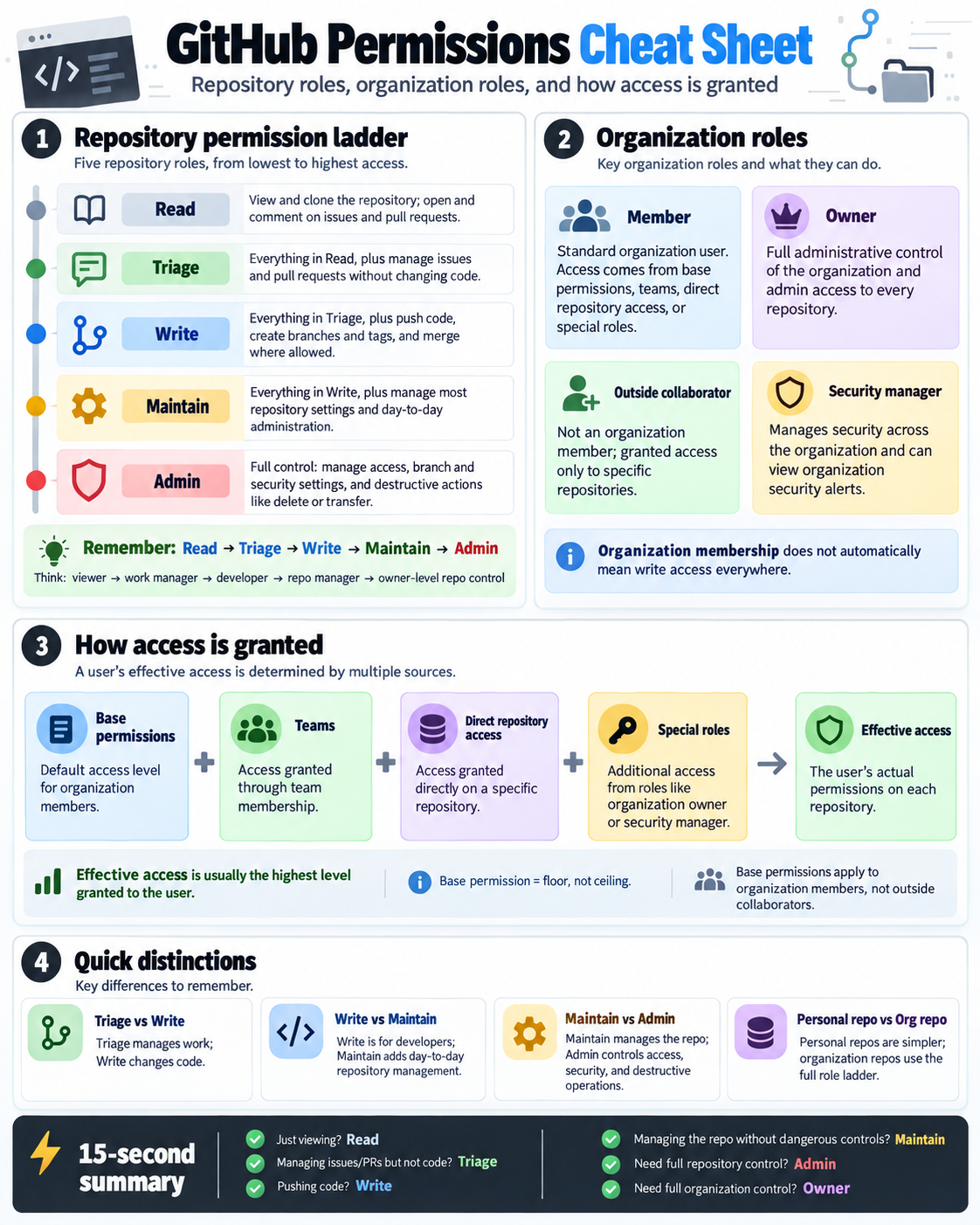
One of the visual cheat sheets I used while studying. Permissions were a good example of something I understood in practice but wanted to be much more precise about for the exam.
GitHub Copilot (GH-300)
The Copilot exam is narrower in scope, but it gets deeper into the product.
It also covers a lot more than asking Copilot to generate code.
The current exam includes responsible AI, Copilot in the IDE and command line, agent workflows, prompt engineering, context, testing, developer productivity, architecture and data handling, privacy, content exclusions, safeguards, and organizational controls.
It also reaches into newer Copilot capabilities such as Agent Mode, Copilot Edits, MCP, agent sessions, sub-agents, Spaces, code review, reusable instructions and prompt files, and policy and audit controls.
I already used Copilot before I started studying, and that gave me a head start. It didn’t cover everything the exam expected.
Using Copilot teaches you how to get work done with it. The certification asks you to understand more of what is happening around that experience.
How does context get built? What can an organization control? How is data handled? What do content exclusions actually do? How do the different Copilot experiences fit together?
There are also administrative areas you may rarely touch unless you’re responsible for Copilot at an organizational level.
Foundations felt like a tour across GitHub. Copilot felt more like picking one large part of GitHub and looking under the hood.
I studied for them differently because of that.
Official objectives:
The study stack that worked for me
I spent roughly a week doing focused prep, mostly in smaller chunks around work and onboarding.
I used several resources because they were useful for different things.
Microsoft Learn
I started with Microsoft Learn for both exams.
It gave me a map of what I was responsible for knowing.
I went through the official material, reviewed the exam objectives, and used the practice assessments to get an early baseline.
I wasn’t trying to memorize every paragraph. I wanted to know where the boundaries of the exam were and which parts I needed to spend more time on.
The practice assessments were useful because I could come back to them later and see whether the extra studying was making a difference.
LinkedIn Learning and the official video training
I also used LinkedIn Learning and the official video training for the certifications.
These were mostly background material for me.
I listened while I was doing other things instead of treating every video like a class where I needed to take notes. That gave me another pass at concepts I’d already seen in Microsoft Learn and kept the terminology fresh without requiring a full study session.
I wouldn’t use video alone to prepare for either exam, but it was useful reinforcement.
Greg Gingo and Katie May’s certification study tool
When I was at my computer and wanted to drill questions, I kept coming back to a certification study tool built by my colleague Greg Gingo, with help from Katie May.
It gives you one question at a time, grades the answer, and automatically puts missed questions back into the queue.
That last part was what I liked most.
If I got something wrong, I couldn’t just read the answer, think “yeah, that makes sense,” and move on forever. Eventually the question came back and I had to get it right.
It also tracks first-attempt accuracy separately from overall accuracy and saves progress between sessions.
For desktop practice, it worked really well because it kept bringing weak questions back until they stopped being weak.
ghcertified
I also used the community-maintained ghcertified question banks a lot.
The main benefit was more reps.
Reading an explanation is one thing. Seeing the same concept buried inside a multiple-choice question with several plausible answers is different.
That was especially useful for Foundations, where the exam covers enough of GitHub that small product details can easily hide outside your normal workflow.
The limitation showed up more with Copilot. Community question banks don’t always move as quickly as the product or the certification blueprint.
I treated ghcertified as practice material and kept the official objectives as the source of truth for what I was actually responsible for knowing.
That became especially important for newer Copilot features.
ChatGPT and Muse
The AI part of my studying happened pretty naturally.
I already use ChatGPT and Muse throughout the day, so I started using both for certification prep too. There wasn’t a planned division of labor between them.
I used whatever fit the moment.
At my desk, Greg’s tool was usually my favorite way to drill.
If I had five or ten free minutes somewhere with my phone, I could open ChatGPT or Muse and do another set of questions.
That ended up being more useful than I expected because studying didn’t require finding a free hour. Five minutes was enough to get a few more reps in.
The AI quizzes were also easy to steer.
If I kept missing one topic, I could ask for more questions on that topic. If the distractors were too easy, I could say so. If I wanted more multi-select questions, I could get those.
When a topic still wasn’t sticking, I changed the format. I used ChatGPT to make custom infographics and visual cheat sheets, and Muse helped me make condensed cram sheets near the exams.
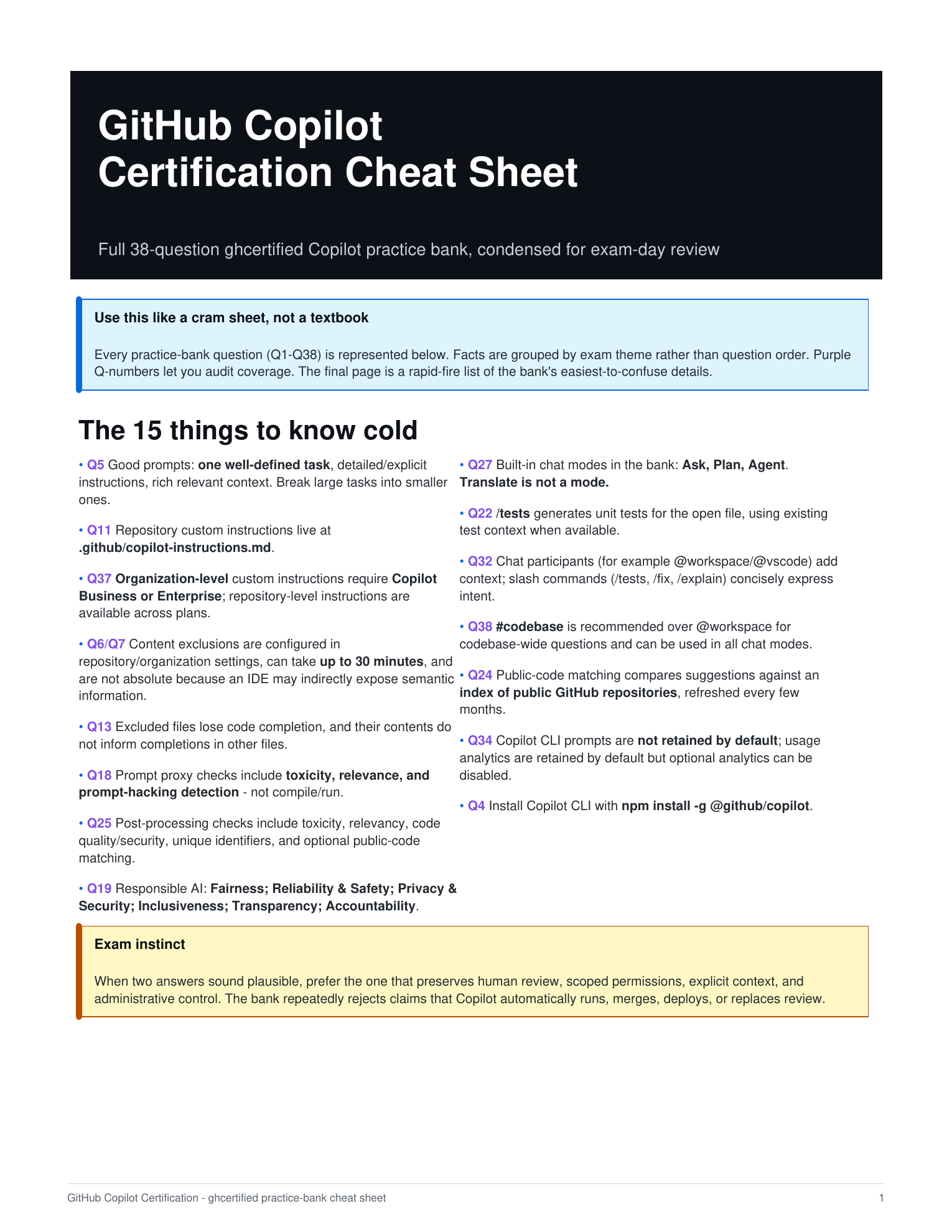
One of the Copilot cram sheets I used near the end. By then I wasn’t trying to learn from scratch. I wanted something I could scan quickly to jog my memory.
The pattern that emerged was simple:
Learn something. Test it. Find the gaps. Work on the gaps. Test again.
That ended up being the method behind everything else.
The feedback loop was the real study method
I’ve done certification prep before where studying is mostly linear.
Finish a module. Watch the next video. Read the next section. Keep going until you’ve completed everything.
The problem is that you spend a lot of time reviewing things you already know.
Practice tests gave me a better way to decide what to study next.
If I missed several questions about permissions, I studied permissions.
If Copilot questions kept exposing uncertainty around content exclusions or administration, I went there next.
Then I tested those areas again.
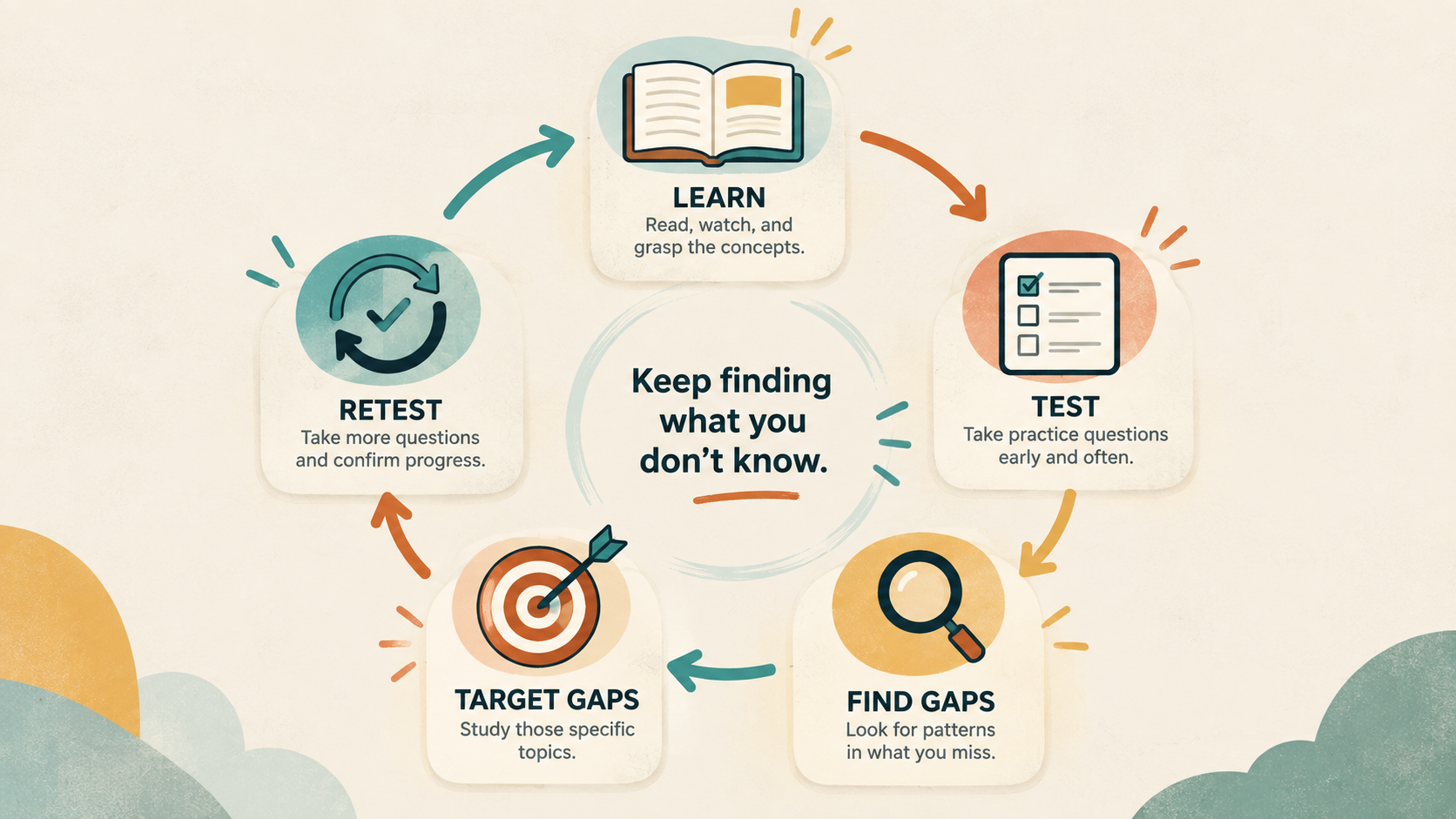
Practice scores are data, not grades
One of the more useful moments in my Copilot prep came after I’d already done well on broad practice material.
I took a small quiz that was deliberately concentrated around some areas where I was weaker and did badly on it.
That was useful.
A broad test gives you a sense of how you’re doing across the whole exam. A targeted test removes the subjects you’re comfortable with and spends all its time in the uncomfortable parts.
Of course the score can drop.
That set gave me a short list of things to fix, which was much more useful than another reassuring score on material I already knew.
The cycle became pretty straightforward:
- Take a quiz or practice test.
- Look at what I missed.
- See whether the misses cluster around anything.
- Study those areas.
- Test them again.
I wanted to find the surprises while I was studying.
Make the questions hard enough
I also learned pretty quickly that an AI-generated quiz isn’t automatically a good quiz.
Some of the early custom sets were too easy. The wrong answers were so obviously wrong that I could get the question right through elimination.
That doesn’t tell you much about whether you know the material.
So I started asking for better distractors, harder questions, and more multi-select questions.
Foundations in particular benefited from multi-select practice because it forced me to be precise. Spotting one answer that looks right is easier than deciding whether two or three similar statements are also correct.
A good practice question should expose uncertainty when it’s there.
What worked, and what didn’t
A few things clearly helped more than others.
Answering lots of questions worked
Reading and videos gave me the base knowledge.
Questions made me prove that I could retrieve it.
You can read a page about repository roles and think you understand it. Then you get four plausible permission scenarios and suddenly find out whether you really do.
Once I understood the basics, I got more out of practice questions than I did from rereading the same material.
Following the misses worked
Once a weakness showed up, I wanted more questions about it.
Greg’s tool did some of that automatically by bringing missed questions back. ChatGPT and Muse let me generate new questions around the same concept.
If I still wasn’t getting it, I changed the format and tried a visual or a condensed explanation.
The topic stayed the same. The way I studied it changed.
Making studying easy to start worked
Having different tools for different situations mattered too.
At my desk, I could use Microsoft Learn or Greg’s tool.
On my phone, I could do a few questions almost anywhere.
I didn’t need to wait for a big block of study time.
Those smaller sessions kept the momentum going because there was almost no setup involved.
Passive review had limits
I liked the videos, but listening to an explanation and understanding it in the moment didn’t always mean I could answer a question about it later.
Reading and videos were good inputs for me.
Questions were how I checked whether the material stuck.
Chasing a pretty practice score didn’t help much
Once I was doing well overall, another broad test full of familiar material wasn’t that useful.
Ten hard questions on something I didn’t know told me more.
I’d rather find a gap during practice than protect a nice-looking average.
No question bank is complete
A large practice bank can still have holes.
That was especially obvious with Copilot because the product changes quickly and the certification has changed with it.
The community banks were useful for practice, and the official objectives kept me honest about scope.
I needed both.
The short version
Take more tests, but pay more attention to what you miss than to the score.
A good practice test should tell you what to study next.
Exam day: What the two tests felt like
By the time I sat down for the actual exams, the process felt familiar.
I took both online and finished each in under 30 minutes.
I wasn’t trying to go fast. I had simply answered enough practice questions by then that I knew when I could answer and move on and when I needed to slow down.
There weren’t many moments where I felt completely blindsided.
After a week of reading certification-style questions, working through plausible answers, being careful with multi-selects, and deliberately spending time on weak areas, the real exam felt a lot like another practice set.
This one just counted.
The biggest surprise was how normal it felt
Certification exams can pick up a lot of psychological weight before you take them.
You study, schedule the appointment, go through online check-in, and then wait for the first question to appear.
Once it did, the work itself felt familiar.
I’d already practiced reading carefully, slowing down when wording mattered, and reasoning through questions I wasn’t immediately sure about.
That repetition helped more than trying to memorize every possible fact.
Pacing wasn’t a problem
If I knew something, I answered it and moved on.
If I wasn’t sure, I slowed down and worked through it.
Both exams took me less than half an hour, and I passed both comfortably.
The second happened less than 24 hours after the first.
That was a fun milestone. The better sign was that neither exam felt very different from the practice I’d already been doing.
If I were taking them again tomorrow
I wouldn’t change the process much. I’d just be more intentional about it from the beginning.
1. Start with Microsoft Learn and the current objectives
Start with the official material.
Look at the current exam objectives and work through Microsoft Learn before you spend too much time in question banks.
That keeps you from accidentally treating the contents of one practice bank as the entire exam.
This matters even more for Copilot because the product moves quickly.
2. Take a practice test early
Don’t wait until you feel ready.
An early practice test gives you a baseline and starts showing you where the gaps are.
Look past the percentage.
What did you miss?
Was it permissions? Projects? Administration? Content exclusions? Prompting? Security?
Use that to decide what comes next.
3. Use the resources for what they’re good at
I wouldn’t spend much time trying to figure out which resource is “best.”
Microsoft Learn gave me scope.
Videos reinforced concepts.
Question banks gave me repetition.
Greg’s tool drilled the misses.
ChatGPT and Muse let me target specific areas and study from my phone.
They fit together.
4. Move into practice pretty quickly
Once you’ve got the basic concepts, start answering questions.
Miss something, figure out why, and get more practice around it.
I got more from that loop than I did from repeatedly rereading material I’d already understood.
5. If you’re around 70%, keep going
If I were consistently scoring around 70% on practice material, I wouldn’t consider myself ready yet.
I also wouldn’t start everything over.
I’d take more practice tests and figure out where the missing 30% is coming from.
If the misses are spread across every domain, you probably need more general study.
If they’re concentrated in two or three places, focus there and retest.
The percentage matters less once you understand what’s behind it.
6. Decide when to schedule based on your situation
My situation was a little unusual because the certification exams were available to me at no cost as a GitHub employee.
That made it easier to be aggressive about taking the second exam quickly.
After I passed Foundations and was doing well in Copilot practice, there wasn’t much downside to scheduling GH-300 right away.
If I were paying for every attempt myself, I probably would have waited a little longer.
I wouldn’t use one practice score as a universal booking threshold.
I’d look at the pattern of misses, whether those misses are shrinking, the cost of another attempt, and how comfortable I feel with the remaining gaps.
You don’t need to know everything.
You should know where you’re still weak.
The final 48 hours
Inside the last couple of days, I’d stop trying to expand the amount of material I knew.
I’d tighten up the weak spots.
Retest the weak areas
Go back to the topics that caused trouble and test those directly.
If you’re still missing something repeatedly, keep working on it.
If you’ve fixed it and you’re consistently getting it right, move on.
There’s no reason to review the same strong topic for the tenth time just because reviewing feels productive.
Compress the material
Near the exams, I wanted things I could scan quickly.
Muse helped me make condensed cram sheets. ChatGPT helped me make visual summaries and infographics for topics where seeing the information differently helped.
At that point, those materials weren’t teaching me something new. They were reminders of things I’d already studied.
Don’t add a new resource at the last minute
The night before the exam is a bad time to find a new course and convince yourself you need to finish it.
By then, I’d rather trust the process that’s already been working.
Review the weak spots. Do a few targeted questions. Scan the short notes. Then stop.
Sleep
I’d rather go into the exam rested with 95% of the studying I planned to do than stay up late squeezing in another hour.
Eventually, more studying stops helping.
The night before, being able to think clearly about what I already know is more useful than trying to cram in one more obscure detail.
What I took away from it
I started these certifications because they were part of my onboarding at GitHub.
I had 90 days to finish them and wanted to get them done early. Passing both in my second week, and then realizing I could squeeze them into a 24-hour window, was satisfying.
The part I expect to keep using is the study method.
Experience gives you depth in the things you do all the time. It also makes it easy to overlook the things you rarely touch.
The certifications gave me a reason to go find those areas instead of assuming practical experience had covered everything.
The same idea applies well beyond GitHub certifications.
Spend less time proving what you already know. Keep finding the places where you’re still shaky, work on those, and test them again.
That’s what worked for me here.
It also feels like a pretty good way to start at GitHub: learn the platform, find the gaps, and keep closing them.